Rows and Columns

Columns

Use columns: 40/60

Split with |||

Rows

Use rows: 60/40

Split with ===

Nesting

Use row-columns: 40/60

inside one row block

Rows: top summary, bottom visual

This is the simplest row split:

  • short setup on top
  • large visual region below
Bottom row visual

Nested columns inside a row

Use row-columns when only one row needs a column split.

The lower image auto-fits its row box.

  • right side can hold a denser list
  • or a narrow figure caption
  • while the lower row stays full width

Colloquium wordmark

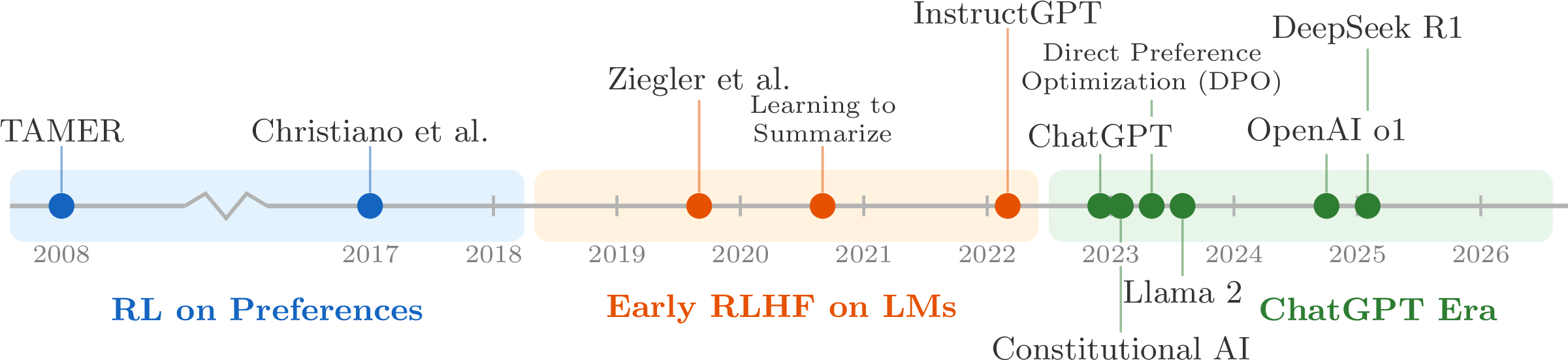
Big top image, small bottom notes

RLHF timeline

  • Good for full-width charts or timelines
  • Bottom row can hold takeaway text or citations
  • Keeps the image from fighting a side column

Three equal rows

Top row can hold a short setup or takeaway.

Middle left can expand into a supporting point.

Middle right can hold a parallel point or comparison.

Bottom row can close with a summary, citation, or next step.

Code blocks in columns

Python code:

messages = [
    {
        "role": "system",
        "content": "You are a friendly chatbot who always responds in the style of a pirate",
    },
    {
        "role": "user",
        "content": "How many helicopters can a human eat in one sitting?",
    },
]

Template text:

<|im_start|>system
You are a friendly chatbot who always responds in the style of a pirate<|im_end|>
<|im_start|>user
How many helicopters can a human eat in one sitting?<|im_end|>
<|im_start|>assistant

tokenizer.apply_chat_template(messages) performs this conversion before tokenization.